> ## Documentation Index
> Fetch the complete documentation index at: https://auth0-genai-fix-a4aa-connections-content-audit.mintlify.site/llms.txt
> Use this file to discover all available pages before exploring further.
# Call First-Party APIs on User's Behalf
> Enable your AI agents to securely call first-party APIs on behalf of authenticated users.
A first-party API in Auth0 is owned and operated by your organization and [registered](https://auth0.com/docs/get-started/auth0-overview/set-up-apis) in the Auth0 Dashboard.
The user can grant your AI agent permission to access a first-party API on their behalf. After a user authenticates, Auth0 issues an access token scoped to the first-party API that contains the permissions granted by the user.
## How it works
The following diagram shows the delegated authorization flow for calling a first-party API:
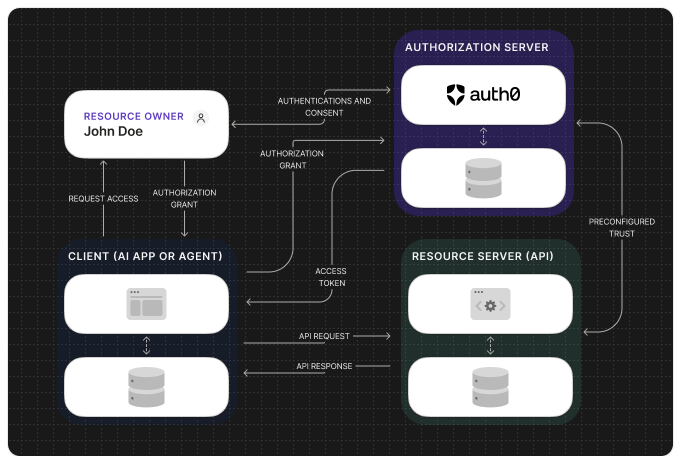
 A user logs into your AI application or agent interface (e.g., via Universal
Login).
After the user authenticates, Auth0 issues an access token to your
application.
When the AI agent needs to access user-specific data or perform an action,
it makes a tool call to an API endpoint.
The access token obtained in step 2 is included in the API request
(typically in the `Authorization` header).
The API validates the access token. If valid, it processes the request on
the user's behalf and returns the response to the AI agent.
The AI agent uses this response to fulfill the user's request.
## Get started
To enable your AI agents to call your own APIs, refer to the following resources:
### Quickstarts
### Sample Apps
### Learn more
A user logs into your AI application or agent interface (e.g., via Universal
Login).
After the user authenticates, Auth0 issues an access token to your
application.
When the AI agent needs to access user-specific data or perform an action,
it makes a tool call to an API endpoint.
The access token obtained in step 2 is included in the API request
(typically in the `Authorization` header).
The API validates the access token. If valid, it processes the request on
the user's behalf and returns the response to the AI agent.
The AI agent uses this response to fulfill the user's request.
## Get started
To enable your AI agents to call your own APIs, refer to the following resources:
### Quickstarts
### Sample Apps
### Learn more