> ## Documentation Index
> Fetch the complete documentation index at: https://auth0-genai-fix-a4aa-connections-content-audit.mintlify.site/llms.txt
> Use this file to discover all available pages before exploring further.
# Authorization for RAG
> Enforce fine-grained, document-level access control in RAG pipelines with Auth0 FGA, ensuring AI agents only retrieve data the current user is authorized to see.
## What is RAG?
Retrieval-Augmented Generation (RAG) provides Large Language Models (LLMs) with relevant, up-to-date information from external data sources, such as a company's internal knowledge base or document repository.
Without proper access controls, a RAG pipeline could retrieve documents containing sensitive information (e.g., financial reports, HR documents, strategic plans) and use them to generate a response for a user who should not have access to that data. This could lead to serious data breaches and compliance violations. Simply filtering based on user roles is often insufficient for managing the complex, relationship-based permissions found in real-world applications.
## What is Authorization for RAG?
[Auth0 Fine-Grained Authorization (FGA)](https://auth0.com/fine-grained-authorization) implements Relationship-Based Access Control (ReBAC) control for your RAG pipelines by decoupling your authorization logic from your application code. Instead of embedding complex permission rules directly into your application, you define an authorization model and store relationship data in Auth0 FGA. Your application can then query Auth0 FGA at runtime to make real-time access decisions.
## How it works
Integrating Auth0 FGA into your RAG pipeline ensures that every document is checked against the user's permissions before it's passed to the LLM.
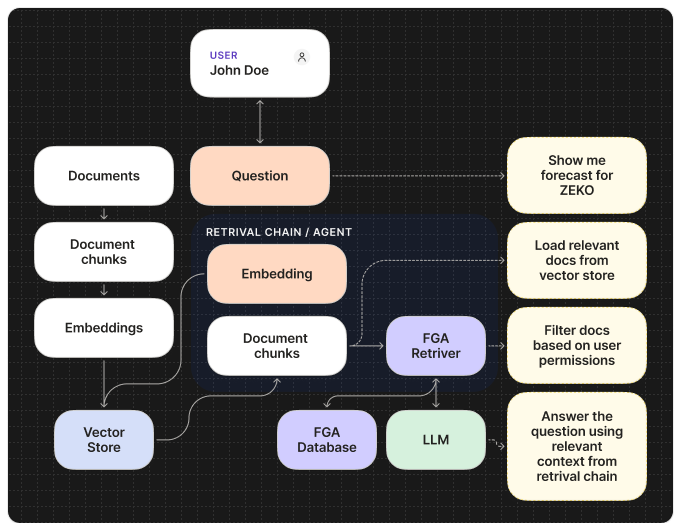
 The Auth0 FGA flow has the following steps:
First, you define your authorization model in Auth0 FGA. This model
specifies the types of objects (e.g., `document`), the possible
relationships between users and objects (e.g., `owner`, `editor`, `viewer`),
and the rules that govern access.
You store permissions as 'tuples' in Auth0 FGA. A tuple is the core data
element, representing a specific relationship in the format of `(user,
relation, object)`. For example, `user:anne` is a `viewer` of
`document:2024-financials`.
When a user submits a query to your AI agent, your backend first fetches
relevant documents from a vector database and then makes a permission check
call to Auth0 FGA. This call asks, "Is this user allowed to view these
documents?". Our AI framework SDKs abstract this and make it as easy as
plugging in a filter in your retriever tool.
Auth0 FGA determines if the user is authorized to access the documents. Your
application backend uses this data to filter the results from the vector
database and only sends the authorized documents to the LLM.
## Get started
To begin using Auth0 FGA in your AI agents, refer to the following resources:
### Quickstarts
### Sample Apps
}
horizontal
/>
}
horizontal
/>
}
horizontal
/>
}
horizontal
/>
}
horizontal
/>
### Learn more
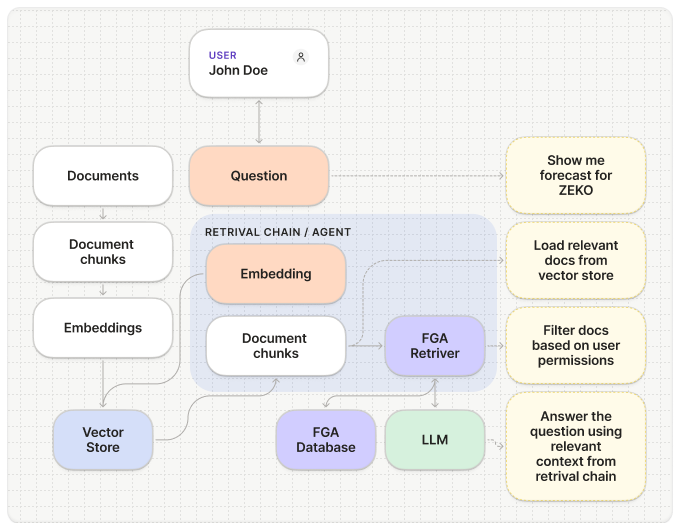
The Auth0 FGA flow has the following steps:
First, you define your authorization model in Auth0 FGA. This model
specifies the types of objects (e.g., `document`), the possible
relationships between users and objects (e.g., `owner`, `editor`, `viewer`),
and the rules that govern access.
You store permissions as 'tuples' in Auth0 FGA. A tuple is the core data
element, representing a specific relationship in the format of `(user,
relation, object)`. For example, `user:anne` is a `viewer` of
`document:2024-financials`.
When a user submits a query to your AI agent, your backend first fetches
relevant documents from a vector database and then makes a permission check
call to Auth0 FGA. This call asks, "Is this user allowed to view these
documents?". Our AI framework SDKs abstract this and make it as easy as
plugging in a filter in your retriever tool.
Auth0 FGA determines if the user is authorized to access the documents. Your
application backend uses this data to filter the results from the vector
database and only sends the authorized documents to the LLM.
## Get started
To begin using Auth0 FGA in your AI agents, refer to the following resources:
### Quickstarts
### Sample Apps
}
horizontal
/>
}
horizontal
/>
}
horizontal
/>
}
horizontal
/>
}
horizontal
/>
### Learn more